Every growing business hits the same wall. It starts with a simple spreadsheet: a few names, some phone numbers, a column for notes. It works fine when you have ten customers. But by the time you have fifty leads, three people on the sales team, and deals moving in different directions, that spreadsheet becomes a maze of duplicate rows, outdated notes, and half-finished follow-ups.
If that sounds familiar, you are not alone. Many Filipino business owners, freelancers, and sales teams are still running their entire pipeline on spreadsheets and chat threads. The good news is that there is a better way. Modern CRM software in the Philippines is now simple, affordable, and built for teams that want to grow without the chaos.
In this article, we will look at why spreadsheets hold your sales back, what a CRM actually does, and how OneCRM by OnePHP Technology helps you track leads, deals, and payments in one simple dashboard.
What Is a CRM, and Why Does It Matter?
CRM stands for Customer Relationship Management. In plain terms, it is a system that stores every customer interaction, lead, deal, and payment in one organized place so your whole team can see the same information at the same time. If you want a deeper definition, Salesforce and Investopedia both offer solid beginner-friendly explanations.
Think of a CRM as the central brain of your sales process. Instead of asking, “Who followed up with that client last week?” or “Did they already pay the downpayment?”, you simply open your dashboard and the answer is there.
For small and medium businesses, this matters even more. You usually do not have a large back-office team, so every minute spent hunting for information is a minute taken away from selling.
The Hidden Cost of Messy Spreadsheets
Spreadsheets are great tools. They are flexible, familiar, and free. But they were never designed to manage a sales pipeline. Here is where they start to break down.
1. Information gets scattered
One file lives on your laptop, another is in a shared drive, and a third is buried in someone’s chat messages. Soon nobody knows which version is the latest. A single outdated file can lead to a missed follow-up or a customer who gets contacted twice.
2. There is no clear view of your pipeline
A spreadsheet can list your deals, but it cannot easily show you where each deal stands, how likely it is to close, or how much revenue you can realistically expect. You end up guessing instead of knowing.
3. Follow-ups slip through the cracks
Without reminders and activity tracking, it is easy to forget who needs a call, a quotation, or a gentle nudge. Every forgotten follow-up is a potential sale left on the table.
4. Payments are hard to track
If you issue invoices or collect installments, tracking who paid, who is pending, and who is overdue across multiple sheets quickly becomes a headache.
5. It does not scale
A spreadsheet that works for one person rarely works for a team. As soon as two or more people edit the same file, errors and conflicts begin.
The result? Wasted time, lost opportunities, and a business that feels more disorganized than it should.
Meet OneCRM: All Your Sales in One Simple Dashboard
OneCRM is a CRM platform from OnePHP Technology designed to replace scattered spreadsheets with one clean, easy-to-use workspace. It brings your contacts, deals, activities, and revenue together so you can see your entire business at a glance.
Here is a closer look at what you can do with it.
A real-time analytics dashboard
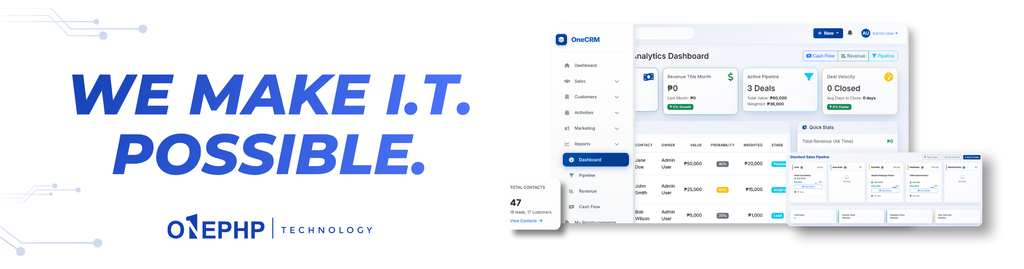
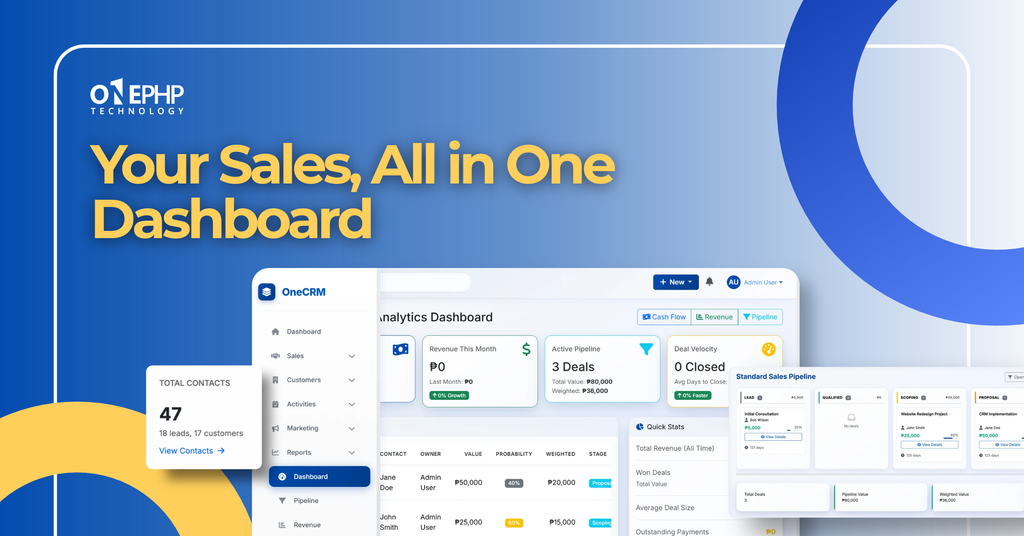
The moment you log in, you see what matters most. The OneCRM Analytics Dashboard shows key numbers in easy-to-read cards, including:
- Revenue This Month: see your current earnings compared with last month, along with your growth rate.
- Active Pipeline: know how many deals are in progress, their total value, and their weighted value based on probability.
- Deal Velocity: track how many deals you have closed and how quickly they move from first contact to signed deal.
- Quick Stats: view total revenue, won deals, total value, average deal size, and outstanding payments in one panel.
No more digging through tabs and formulas. Your numbers are always ready when you are.
(Note: figures shown in the OneCRM screenshots are sample data for demonstration.)
A visual sales pipeline
One of the most powerful features of any CRM is the pipeline view, and OneCRM makes it simple. Your deals are organized into clear stages such as Lead, Qualified, Scoping, Proposal, and Negotiation, so you can see exactly where each opportunity stands.
Each deal card shows the contact person, the deal value, the probability of closing, and how long the deal has been in that stage. At the bottom, you get a summary of total deals, pipeline value, weighted value, and average deal size.
With this view, you can quickly answer questions like:
- Which deals are close to closing?
- Which leads have been sitting idle for too long?
- How much revenue can we realistically expect this quarter?
Contacts, leads, and customers in one place
OneCRM keeps your entire contact list organized. You can see your total contacts at a glance, along with how many are leads and how many are already customers. Instead of searching through multiple files, you simply open a profile and see the full history.
That means every team member, whether in sales, marketing, or customer support, works from the same up-to-date information.
Activities, marketing, and reports
Beyond contacts and deals, OneCRM includes sections for Activities, Marketing, and Reports, so you can plan follow-ups, manage campaigns, and review performance without leaving the platform. The reports section covers Revenue, Pipeline, and Cash Flow, giving you a clear picture of how your business is performing.
Payments and cash flow visibility
Growing a business is not just about closing deals. It is also about getting paid. OneCRM helps you keep an eye on revenue, outstanding payments, and cash flow so you are never caught off guard by a delayed payment.
Spreadsheets vs. OneCRM: A Quick Comparison
| Task | Messy Spreadsheets | OneCRM |
|---|---|---|
| Storing contacts | Scattered across files | One organized database |
| Viewing your pipeline | Manual and time-consuming | Visual, stage-by-stage view |
| Tracking revenue | Formulas that can break | Real-time dashboard |
| Monitoring payments | Hard to follow | Outstanding payments at a glance |
| Team collaboration | Version conflicts | Everyone sees the same data |
| Reporting | Built by hand | Ready-made reports |
Who Is OneCRM For?
OneCRM is a great fit for any business that wants to stay organized and close more deals, including:
- Small and medium businesses (SMEs) that have outgrown spreadsheets.
- Sales teams that need a shared view of leads and deals.
- Service providers and agencies that manage proposals, projects, and recurring clients.
- Entrepreneurs and freelancers who want a professional system without the complexity of enterprise tools.
- Growing startups that need a CRM that can scale with them.
If you are a Filipino business owner looking for CRM software that is practical, clear, and easy to adopt, OneCRM was built with that goal in mind. If you want to learn more about how digital tools can support local businesses, the Department of Trade and Industry (DTI) offers helpful resources for Philippine MSMEs.
5 Benefits You Will Notice Right Away
1. You save time
Instead of updating several files, you update one system. Less admin work means more time for conversations that actually lead to sales.
2. You never miss a follow-up
When every lead and activity is tracked, nothing falls through the cracks. Your team knows exactly who to contact next and why.
3. You make better decisions
With clear numbers on revenue, pipeline value, and deal velocity, you can decide where to focus your energy instead of relying on gut feel.
4. Your team stays aligned
Everyone works from the same source of truth. No more asking, “Which file is the latest?”
5. You look more professional
When clients receive timely, well-organized responses, they trust you more. A good CRM quietly makes your whole business look sharper.
How to Make the Switch from Spreadsheets to a CRM
Moving from spreadsheets to a CRM does not have to be stressful. Here is a simple approach:
- List what you track today. Write down the information you currently keep in spreadsheets, such as names, contact details, deal values, and payment status.
- Clean your data. Remove duplicates and fix obvious errors before importing. A clean start makes everything easier.
- Define your sales stages. Decide how a lead moves from first contact to a closed deal, for example Lead, Qualified, Proposal, and Negotiation.
- Bring your team in early. Show them how the dashboard works and how it will make their daily tasks easier.
- Start small, then expand. Begin with contacts and deals, then add activities, marketing, and reporting as your team gets comfortable.
A good CRM partner will guide you through this process, which is exactly why seeing a live walkthrough can be so helpful.
Common Questions About CRM Software
Do I really need a CRM if I only have a small team? Yes. Smaller teams often benefit the most because a CRM keeps things organized before the chaos starts. It is much easier to build good habits early than to fix a messy system later.
Is a CRM difficult to learn? Not with the right tool. OneCRM is designed with a clean, simple interface so your team can start using it without a long learning curve.
Can a CRM help me get paid faster? It can help. By giving you visibility into outstanding payments and cash flow, a CRM makes it easier to follow up on unpaid invoices before they become a problem.
What is the difference between pipeline value and weighted value? Pipeline value is the total worth of all your active deals. Weighted value adjusts that total based on each deal’s probability of closing, which gives you a more realistic revenue forecast.
Final Thoughts: It Is Time to Upgrade How You Sell
Spreadsheets served you well in the early days, but your business deserves a system that grows with you. With the right CRM software in the Philippines, you can replace scattered files with one clear dashboard, track every lead, deal, and payment, and spend more time doing what you do best: serving customers and closing sales.
Ready to see how it works? Explore the full features of OneCRM, learn more about OnePHP Technology, or go straight to a live walkthrough.
Ready to Say Goodbye to Messy Spreadsheets?
See OneCRM in action and discover how it can simplify your sales process, from first lead to final payment.
Book your free OneCRM demo now