Visual appeal means nothing without technical scalability. Especially when your business architecture has to withstand the pressure of rapid user growth and traffic surges. You can have a flawless marketing campaign and a product that practically sells itself, but managing chaos requires the right infrastructure. In this guide, we explore how modern customer support management software turns messy multi-channel communication into your business’s biggest unfair advantage through the deployment of tailored enterprise tools by OnePHP Technology.
Why Your Business Needs Customer Support Management Software
When a business is just starting out, managing customer service is relatively simple. You get a couple of messages a day on Facebook, an occasional email, and maybe a direct message on Instagram. One person can easily handle it from a smartphone.
But as you scale, your communication footprint multiplies. Suddenly, you aren’t just opening one app; you are jumping between four or five different browser tabs trying to keep up.
Let’s look at why standard communication tools break down under the pressure of business growth:
1. The Fragmented Inbox Trap
Your customers don’t all gather in one place. Some prefer sending a formal email. Others expect an instant reply on a live website chat. A large percentage will message your brand’s social media pages. When your support agents have to constantly log into separate accounts and switch environments just to find a message, they waste massive chunks of cognitive energy. Messages get missed, response times slow down, and customers feel ignored.
2. The “Who’s Got This?” Dilemma
In a standard shared inbox, there is no inherent ownership. If an angry customer emails about an incomplete order, three different agents might open it. One might assume someone else is replying, while the other two might send conflicting answers simultaneously. This lack of clear ownership breeds internal confusion and makes your company look disorganized to the outside world.
3. Zero Operational Visibility
Without a dedicated system, management is flying blind. You cannot easily see how many inquiries your business receives daily, what the most common customer complaints are, or how fast your team resolves issues. Without data, you can’t optimize your business operations.
The Human Psychology of Customer Patience
Before we dive into the technical solutions, we need to understand the human beings on the other side of the screen. Why are fast, organized responses so critical to your bottom line?
Human patience has hit an all-time low. We live in an era of instant gratification—we tap a button and food arrives at our door; we click a link and a movie streams instantly. This shift in lifestyle has profoundly rewired customer expectations.
According to global consumer studies, an average response time of under two minutes is the golden benchmark for live chat. If a customer has to wait longer than that on a live website, they don’t just sit there waiting—they close the tab and check out your competitor.
For email support, while consumers understand it takes longer, they still expect a structured, professional acknowledgment that their issue has been logged and is actively being reviewed. When a business fails to provide this immediate reassurance, anxiety kicks in. A worried customer will often send three more duplicate messages across different platforms, accidentally tripling your support team’s workload.
Omnichannel Chat & Ticketing
To solve the support bottleneck, modern enterprises rely on specialized tools. At OnePHP Technology, we engineered our Chat & Ticketing Support System around a single, powerful philosophy: Support should work for you, not against you.
Instead of forcing your staff to bend to the chaos of incoming messages, a structured customer support management software system bends the chaos into an organized, linear assembly line.
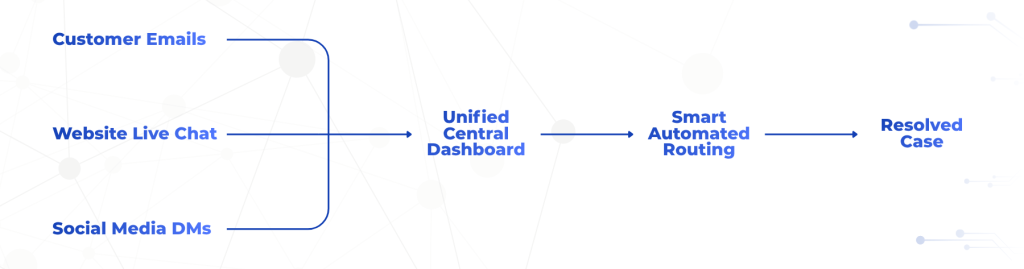
Multi-Channel Support (The Single Pane of Glass)
The foundational superpower of an advanced support system is aggregation. It doesn’t matter if a customer sends an email, types into a website chat box, or reaches out via an integrated social platform—every single communication is pulled into one centralized workspace. Your support agents never have to leave the dashboard. To them, every conversation looks identical, regardless of where the customer sent it from.
Advanced Ticketing (Turning Conversations into Tasks)
When an inquiry lands in the dashboard, the system converts it into a distinct digital “ticket”. Think of a ticket as a physical folder that contains the entire history of that customer’s relationship with your business.
- It shows exactly when they first wrote to you.
- It logs every single message exchanged.
- It tracks who on your team is currently assigned to handle it.
Because conversations are treated as tasks, they can be systematically managed, moved through custom stages, and marked as “Resolved” only when the customer’s problem is completely fixed.
Operational Efficiency Means Nothing Without Clear Structure.
Just like an office requires a high-performance network foundation to run smoothly, your customer service department requires an organized digital backbone to withstand the pressure of market growth.
Inside the Features That Save Time
You don’t need an IT degree to unlock the value of enterprise support software. Here is a clear look at the intuitive tools that do the heavy lifting behind the scenes:
1. Customizable Ticket Statuses
Every business operates differently. A retail store might need stages like “Order Received,” “Checking Warehouse,” and “Shipped.” A software company might need “Bug Reported,” “Engineering Review,” and “Patched.” Modern systems allow you to tailor your ticket stages to perfectly match your specific workflow, giving everyone on your team instant clarity on where a case stands.
2. AI-Powered Chatbots (The First Line of Defense)
Not every customer inquiry requires human intervention. In fact, up to 60% of daily questions are repetitive, low-level inquiries: “What are your store hours?” “Where is my tracking number?” “Do you ship to my city?”
By deploying an intelligent AI chatbot, you can instantly automate responses to these common questions around the clock. The chatbot acts as an automated receptionist. It greets users instantly, resolves simple issues autonomously, and neatly collects customer information before smoothly passing complex cases over to your human agents. Even better, it breaks down language barriers by naturally communicating in multiple languages.
3. Role-Based Access Control
As your team grows, data security becomes vital. You don’t want a newly hired intern accidentally deleting your historical customer databases or accessing sensitive billing settings. Role-based access ensures that every user level has specific permissions tailored to their job description. Agents see the tickets they need to solve, while administrators retain full control over backend configurations.
4. On-the-Go Mobile Accessibility
Customer support doesn’t stop when you step away from your desk. Whether an executive needs to audit an urgent escalation or an agent needs to reply to a high-priority client while commuting, the entire system is fully responsive across all mobile devices. Managing your customer operations becomes as simple as checking your personal phone apps.
Turning Support Data into Revenue
Many business owners view customer service strictly as an expense—a necessary cost of doing business. This is a massive strategic oversight. When equipped with detailed reporting and data analytics, your support dashboard transforms into a direct source of market intelligence.
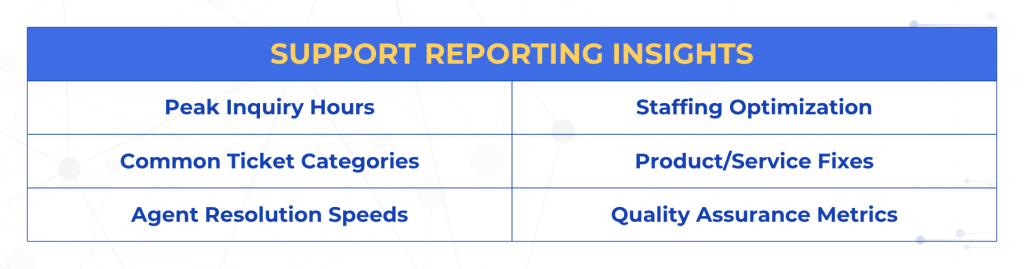
By closely monitoring your data-driven reports, you unlock invaluable business insights:
- Identify Product Friction: If your ticket metrics show a sudden spike in customers complaining about “checkout errors,” you instantly know your website’s payment gateway needs attention before it hurts your sales.
- Optimize Staffing Schedules: Detailed reports show you exactly what times of day your business receives the highest volume of messages. You can use this data to schedule your agents precisely when they are needed most, eliminating wasted payroll hours.
- Measure Team Quality: You can easily track individual response times and resolution quality, making it simple to reward your top-performing support agents and identify who needs additional training.
Building Your Scalable Support Architecture
At the end of the day, technology should simplify human connection, not complicate it. Transitioning away from manual, scattered communication to a unified system is one of the most impactful operational upgrades an expanding business can make.
By centralizing your conversations, empowering your agents with custom workflows, and deploying smart AI automation, you protect your team from burnout while ensuring your customers receive elite service every single time they interact with your brand.
Don’t wait for a flood of unread emails to break your team’s morale and drive away your hard-earned customers. Build a support framework that scales alongside your ambitions.
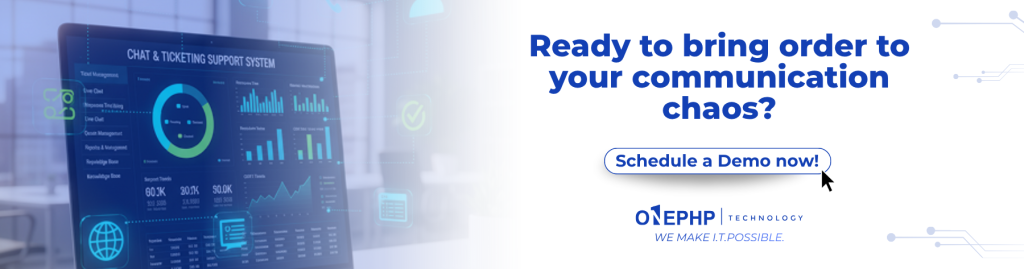
Ready to bring order to your communication chaos?
Make customer care effortless with an intuitive, all-in-one support dashboard built to scale up your business efficiency.
🔗 Schedule a Demo with OnePHP Technology Today